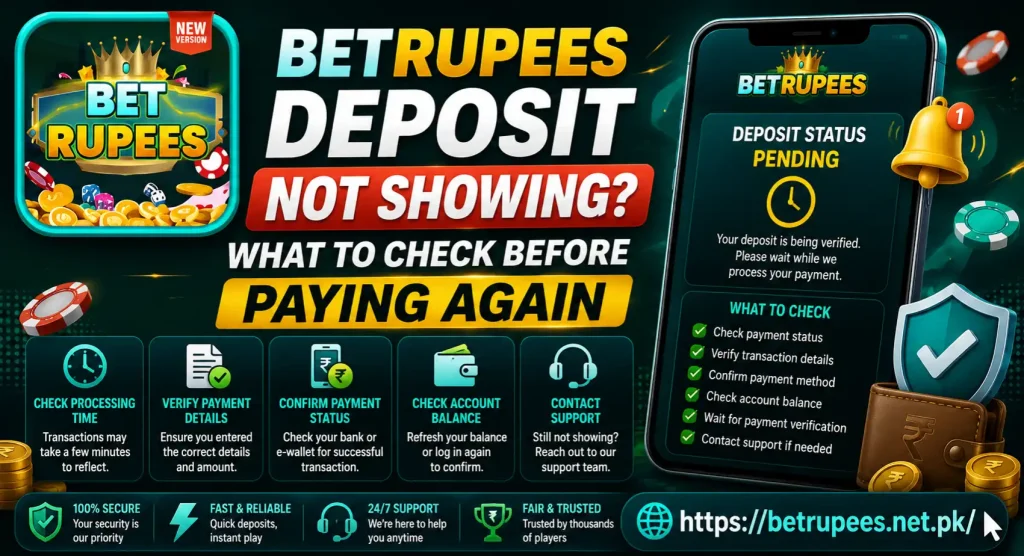
BetRupees Deposit Not Showing? What to Check Before Paying Again
You send the payment, your wallet shows a deduction, but the BetRupees balance stays the same. The first reaction may be to make another deposit. Do not do that yet.
A BetRupees deposit not showing can mean the payment is still pending, the account balance has not refreshed or the transaction was not matched with the correct deposit order. Check what happened to the first payment before sending any more money.
Check Both Transaction Records
There are two records to examine: the payment record in your wallet or bank and the deposit record inside BetRupees.
Open the payment service you used and find the transaction. Then open the wallet, cashier, deposit history or transaction section in your BetRupees account.
Compare the information shown in both places:
- Amount
- Date and time
- Transaction status
- Payment method
- Transaction reference
- Deposit order number
- Recipient details
A completed wallet payment with no BetRupees record is different from a transaction that remains pending in both places.
What Does the Payment Status Say?
Do not rely only on an SMS notification. Open the payment app and check the actual transaction status.
You may see:
- Successful: The payment service shows that the transfer was completed.
- Pending: The transaction has not reached a final status.
- Failed: The service did not complete the payment.
- Reversed: The amount was returned or is being returned.
- Cancelled: The transaction stopped before completion.
When the payment remains pending, wait for the sending service to update it. BetRupees Deposit Not Showing cannot add a transaction that has not been completed by the payment provider.
If it shows failed or reversed, check whether the full amount has returned to your available balance before trying anything else.
Look for the Deposit in Your BetRupees History
Open the BetRupees deposit history instead of checking only the main balance. The transaction may already be recorded as pending or processing.
Note the exact status and look for an error message. Some transaction pages also display a reference number or expected processing period.
If the request is visible and still processing, do not create another order for the same payment. A second request will not necessarily speed up the first one.
When no deposit record appears, think back to the steps you followed. Did you create a deposit order inside BetRupees before transferring the money? Sending money without completing the on-screen process may make it harder for the system to match the transaction.
Confirm That You Used the Correct Account
A payment can be completed correctly but associated with a different BetRupees Deposit Not Showing account.
This can happen when:
- Another username was saved in the app
- You logged in through a different phone number
- More than one person uses the device
- You switched between two accounts
- The browser opened an older saved session
- You created a second account accidentally
Open your profile and check the username or registered number. Make sure it is the account where you expected the balance to appear.
Do not create another account to solve the problem. That can make it harder to identify which account belongs to the original payment.
Review the Payment Details
Deposit destinations and instructions may change. Use only the details generated for your current transaction.
Do not send money to a number copied from:
- An old deposit
- A saved screenshot
- A YouTube video
- A WhatsApp message
- A social-media comment
- Another user’s account
Check whether the recipient details on your payment receipt match the information displayed when you created the deposit order.
If the payment was sent to the wrong number, do not send another transfer to correct it. Save the receipt and contact the payment provider and platform support through their verified channels.
Check the Deposit Amount and Current Limits
A deposit can fail to match when the amount does not meet the conditions displayed on the payment page.
Review whether:
- The amount was entered correctly
- It falls within the current limits
- A service fee changed the received amount
- The payment was divided into several transfers
- The amount matches the deposit order
- The selected payment channel supports that amount
Do not depend on limits mentioned in an old blog post. Transaction requirements can change, so check what appears inside the current BetRupees Deposit Not Showing payment screen.
Give the Balance Time to Refresh
A successful payment and an updated game balance may not appear at the same moment. The payment provider may show completion before BetRupees finishes matching the transaction.
Check whether the deposit screen provides an expected processing period. If it does, wait until that period has passed.
While waiting:
- Keep the payment receipt.
- Do not repeat the transfer.
- Avoid cancelling the deposit order.
- Refresh the transaction page occasionally.
- Note any change in the payment status.
Do not rely on a guaranteed number of minutes from an older article. Processing can depend on the payment method, account status and current transaction volume.
Refresh the App Without Deleting Your Data
Sometimes the transaction has been recorded, but the app continues showing an old balance.
Try these simple checks:
- Refresh the wallet page
- Close and reopen BetRupees
- Switch between Wi-Fi and mobile data
- Log out and sign in again
- Restart your phone
- Check the account through a browser, if supported
- Review notifications and transaction history
Avoid clearing all application data unless you remember your username and password. Clearing data may sign you out without fixing the payment.
If you clear anything, start with the app cache. Do not uninstall the app until you have saved your login information and transaction evidence.
Check Whether the Missing Amount Is Actually a Bonus
Your cash deposit and promotional reward may appear in different account sections.
If the deposited amount is visible but the expected extra reward is missing, the deposit itself was probably completed. Check the Rewards, Bonus, Activity or Promotion section instead.
The bonus may:
- Require manual activation
- Appear in a separate wallet
- Still be processing
- Apply only to selected payment methods
- Require a qualifying deposit amount
- Be limited to eligible accounts
- Have expired
- Include wagering conditions
The BetRupees app rewards and bonuses article explains common reward types. However, current terms displayed with the promotion should always take priority.
Do not make another deposit simply to trigger a missing bonus.
Did You Pay From Someone Else’s Wallet?
A payment made through another person’s wallet may be difficult to match with your BetRupees Deposit Not Showing account. The sender’s name and mobile number may differ from the details connected with your profile.
Use your own payment account whenever possible. If you already used a family member’s wallet, report the correct sender information when asking for help.
Never hide or alter the transaction details. At the same time, do not share the wallet PIN, OTP or password with support.
Save Evidence Before Contacting Support
A clear payment record can help support locate the transaction. Prepare everything before sending a message.
Save:
- BetRupees username or partly hidden phone number
- Deposit amount
- Date and approximate time
- Payment method
- Transaction ID
- Deposit order number
- Wallet payment status
- BetRupees deposit status
- Screenshots with sensitive information hidden
A short support message could say:
I created a BetRupees deposit on [date and time] using [payment method]. The payment shows successful, but the amount is not visible in my account. My transaction ID is [ID] and the deposit order number is [number]. Please check its status.
Do not send the same complaint repeatedly. Keep one conversation and save any reference number provided by support.
Contact the Right Service
The correct contact depends on where the payment stopped.
If the wallet or bank shows pending, failed or reversed, contact that payment provider first. It can check whether the money actually left your account.
If the provider shows successful but the BetRupees balance has not changed, contact the platform through the support option displayed inside your account.
Your informational website cannot access a user’s BetRupees wallet or manually credit a payment. Visitors should not send account passwords or payment credentials through the website’s general contact form.
The broader BetRupees payment-problems article can be used for issues that do not relate specifically to a missing deposit.
Avoid Fake Deposit-Recovery Agents
A missing payment can attract scammers who claim they can release the balance. They may ask for a fee, OTP or remote access to your phone.
Never share:
- BetRupees password
- OTP or verification code
- Wallet PIN
- Banking password
- Card security code
- Account-recovery code
- Complete identity details through an unofficial chat
Do not send a “release fee” to a personal wallet. Genuine payment tracing uses the original transaction ID and deposit record.
The BetRupees safe-gaming article contains additional precautions for protecting money and account information.
When Can You Try Another Deposit?
Only consider another payment after the first transaction has reached a clear final status.
A new attempt may be reasonable if:
- The first payment failed
- The amount was fully reversed
- No deposit request remains active
- The reason for failure is understood
- The latest payment details have been checked
- You can afford the financial risk
Start with an amount that meets the current on-screen rules but remains within your personal budget. Never use borrowed money or funds required for food, bills, rent or emergencies.
BetRupees Deposit Not Showing Final Thoughts
When a BetRupees deposit is not showing, check the payment app, deposit history, transaction reference and account details before paying again. A pending or unmatched transaction needs investigation, not a duplicate transfer.
Save the receipt and contact the correct service if the displayed processing period has passed. Never reveal your OTP, password or wallet PIN to someone offering to recover the payment.
BetRupees involves real-money gaming and possible financial loss. It should only be used by adults aged 18 or above, and no deposit, bonus or game guarantees a profit.